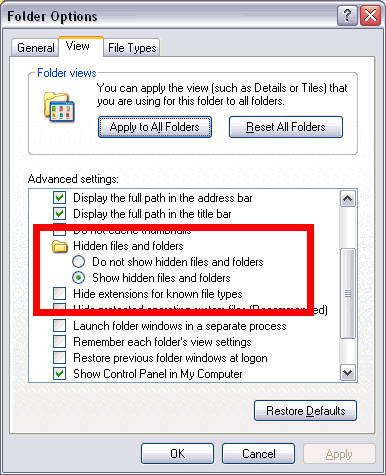
Make Windows show file extensions and hidden files
Problem
Most files on Windows PCs have a File Name followed by a period followed by a "file extension" of three or more characters.
For example:
- PowerPoint files have names like FileName.PPT or FileName.PPTX and so on
- Image files have names like FileName.JPG, FileName.PNG, FileName.BMP and so on
The extension is how Windows knows what type of file it is and what program to launch when you double-click the file's icon.
Most of the time, you don't really need to see the extension, and in fact Windows hides the extension from you, unless you force it to change its ways. Which is a pretty good idea, as it turns out.
Sooner or later, you'll need to view or change a file extension or search for files of a certain extension, but as long as Windows is hiding your files from you, you can't do that.
Worse: If you need to find files of a certain extension, Windows Explorer's File Search feature won't find them if Windows is hiding extensions. That is, if you search for *.TXT, it won't find your .TXT files.
And Even Worse: Some programs, notably Office ones, won't even show extensions in file save/open dialog boxes. This can really turn round and bite you. Suppose you've learned that saving a file as a .PPS is the same as saving it as a PowerPoint Show. So you choose File, Save As, and add a .PPSX extension to the file name in the Save dialog.
You think you've just saved MyShow.PPSX
Wrong. Check for toothmarks on your sensitive bits, you've just been bitten! In fact, PowerPoint has tacked on its usual .PPTX extension AFTER your .PPSX, but since Windows is hiding file extensions from you, you don't see it. You've actually just saved MyShow.PPS.PPT ... which of course behaves like a regular PowerPoint file, not a Show.
And still worse, Windows also hides some files and folders from you altogether.
To avoid confusion, teach Windows to show you your stuff. Here's how:
Solution
In Windows 10
- Start Windows File Explorer
- In the View tab, choose Options
In Windows 7 and previous:
- Go to Control Panel and click Folder Options
Now in either Windows version: