Print larger handouts
Problem
When you print handouts of your presentation, PowerPoint makes the slide images too small to read but leaves lots of wasted white space around the individual images. Why can't it make the images fill the available space? And make them BIGGER?
Your printer may be able to help
Some printers will print multiple pages/slides per sheet of paper, usually with much bigger images of each slide than PowerPoint allows when you print handouts normally. The trick is to print SLIDES, not handouts, then in PowerPoint's print dialog box, click Printer Properties. Set the printer to print multiple pages per sheet of paper. Each printer's settings will be different, but here are a couple examples:
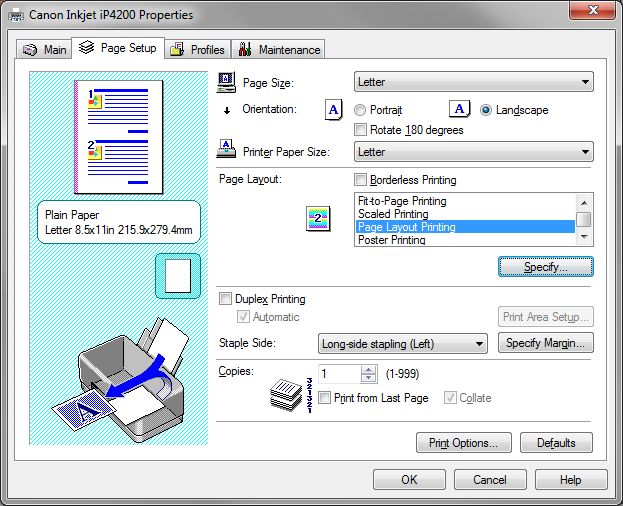 Typical print dialog for an inexpensive Canon inkjet printer. After picking Page Layout Printing, click Specify to choose the exact layout.
 HP laser printer dialog. Under Pages per Sheet, choose the number of pages desired.
The PDF Solution
One of our favorite ways around this problem is to make a PDF file then print the handouts from Acrobat Reader (or Acrobat). Acrobat does the heavy lifting, so your printer doesn't have to. This works with any printer driver.
You can save directly to a PDF file if you have PowerPoint 2007 or later; if you have an earlier version, you'll need Adobe Acrobat or some other program that supplies a PDF printer driver.
First, make a PDF of your slides (not handouts)
Save directly to a PDF file if you have PowerPoint 2007 or later.
if you have an earlier version, you'll need Adobe Acrobat or some other program that supplies a PDF printer driver. In that case, in the PowerPoint Print dialog box:
- Choose your PDF printer driver (Adobe PDF, for example)
- Under Print what: choose Slides
- Put a check next to Scale to fit paper
Open and print from your PDF to make handouts
- Open the PDF in Adobe Reader or Acrobat.
- Choose the Print option.
- Set up the print dialog box as follows:
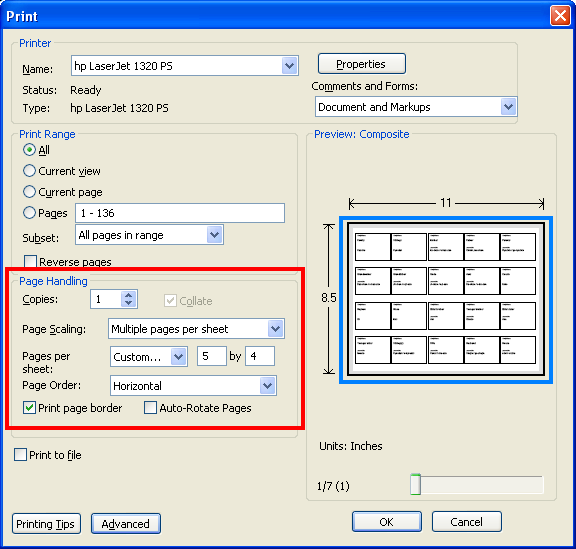
The area we're concerned with is the part we've outlined in red. Choose:
- Page scaling: Multiple pages per sheet
- Pages per sheet: Custom
Experiment with different numbers of columns and rows to find sizing and proportions that work well for your needs. Notice that you get a useful preview in the area we've outlined in blue here.
Put a check next to Print page border to make it easier to see where the individual slide edges appear. You can remove the check before actually printing if you like.
Print your handouts. Voila.
I want more! More control. More flexibility. More features.
It'll cost you, but only a little, and you'll get a lot. Have a look at Shyam's Handout Wizard